
Locate all physical/paper ballots, including those sent by mail, cast in person, or received through other means.

⚠️ Do not open the outer envelopes yet!
Stack up sealed outer envelopes, getting them ready for the Voter Verification.
Quick Guide to the 10 Steps Involved
(Steps marked in blue can be performed by chief and/or assistant chief tellers.)
1
Locate and Stack All Mailed Outer Envelopes:
These are the envelopes that were mailed directly to a designated address as well as those filled out for votes received by email, text, or phone calls. Some in-person paper ballots may also be submitted in an outer envelope. Mark each envelope as "Absentee" or "In-person".
2
Log In to OBS and Set Up Telling Stations:
Click on “Set Up Telling Stations”. The system needs to know how many stations you wish to set up and which tellers will work at each station. One station can include: one table/desk, one laptop or desktop computer, and two or three tellers.
⚠️ IMPORTANT: If there are no paper ballots to process and all ballots were cast online, the chief teller can choose the option “Online Ballots only” from the main election dashboard for tellers.
3
Start by Launching Each Stations, One at a Time:
Log in to each laptop/PC as a chief/assistant chief teller and from the Dashboard, click “Go to Telling Stations” to launch a station. The system will prompt you to choose which station you wish to launch.
4
Using the Outer Envelopes, Perform Voter Verification:
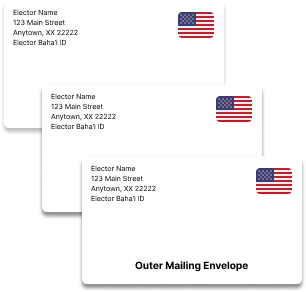
Verify each voter using the Bahá’í ID Number (or name) located on the top-left corner of each outer envelope. If verified, write “Absentee” or “In-Person” on each envelope as instructed by the chief teller. If from an ineligible elector or it is a duplicate ballot (i.e., the voter already voted online), mark it as such and set aside. Repeat for each outer envelope. Once all are finished, click “Complete Step.”
5
Open Outer and Inner Envelopes and Stack the Ballots:
Open the outer envelopes and remove the inner envelopes. If an inner envelope has any identifying marks, mark it as invalid and set it aside. If an inner envelope is missing, count it as invalid.
Open the remaining inner envelopes and remove and stack the ballots; DO NOT separate/cut the ballot.
Before you start entering the ballots, account for all envelopes on hand. Please retain the outer envelopes.
6
Perform Ballot Entry and Account for all Ballots:
You are now ready to enter the name(s) from each ballot. Once all ballots are entered, click “Complete Step.”
7
Sign the Station Report Electronically:
The system will take you to “Reporting.” Verify station statistics and sign electronically by checking the boxes next to each tellers' name and clicking “Complete Telling Process”.
8
Merge Results:
Once all stations have completed their processes, click “Start Merge” to consolidate/merge the results from all stations with the online ballots.
9
Break the Tie:
If the minority principle cannot be used to resolve a tie vote, follow instructions for a revote in the user guide "Handling Tie Votes."
10
Sign the Tellers' Report:
Verify the common statistics, election results and sign electronically by checking box(es), and clicking “Sign and Save.” Then wait until the current Local Spiritual Assembly secretary/officer confirms the results
[Not applicable to RBC elections.].